

The philosophy of automated tests

My name is Vladimir Smirnov, and I am responsible for testing the trading backend at EXANTE. Development moves fast. Regression suites grow. With them come the chaos and inconsistency of test environments, and a steady rise in unstable failures, known as flakes. Real problems hide behind those flakes. How do we keep our automated tests in acceptable shape without spending too much time on it? That is what this article is about.
What is happening
As I described in my previous article, writing at least one automated test per task is mandatory in how we test at EXANTE. I am talking about service tests, the kind that hit the API of a specific microservice running in a live environment with all its dependencies.
In practice, of course, one test per feature is rarely the end of the story. Tests come in batches.
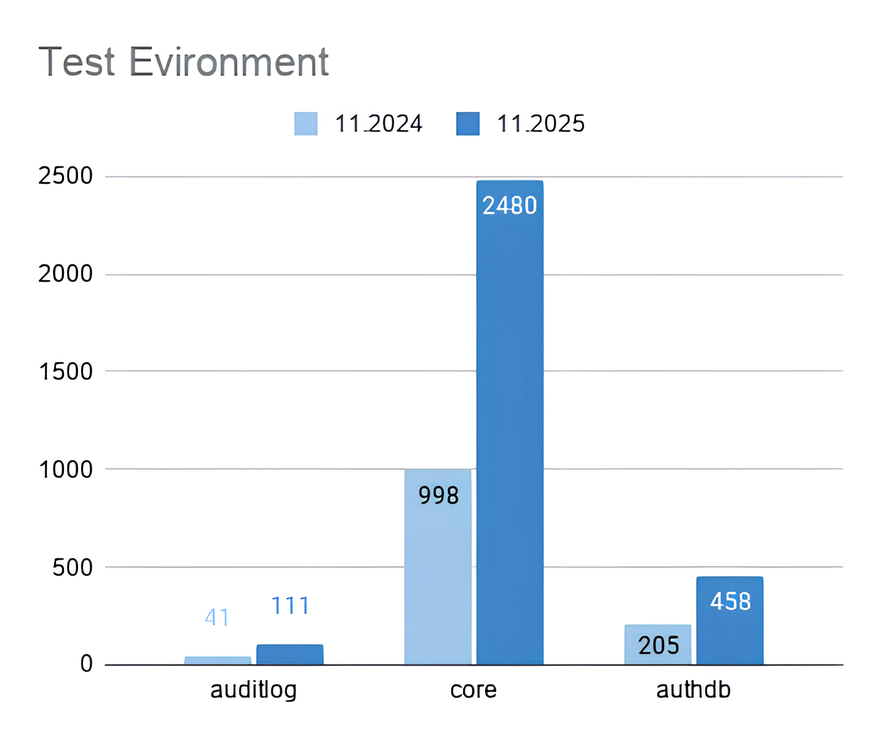
Chart showing the growth of automated tests over the year.
And it is not just tests that grow. Test jobs grow, too. Each team owns several microservices, and each one has its own job in CI/CD. Some services have grown heavy with functionality. While they wait to be split up, they accumulate large test sets. We have already moved parts of these into separate jobs, and some of them run against both the monolith and the new service. Other jobs cover specific configurations on a separate instance. Some functionality cannot run in parallel at all, so it has to be split out and run on its own.
There are also different reasons to run tests in the first place: changes in a merge request, nightly runs, and acceptance during deployment. The number of runs across different environments continues to grow. We make them faster by optimising, isolating and parallelising. And in return, we get a steady increase in unstable failures across different tests, environments and situations.
The causes vary. Some have nothing to do with the service under test, such as environment configuration we did not account for, or conflicts between tests running in parallel. Others are clearly the service’s fault: race conditions, dependencies on other services and so on.
If we close our eyes to individual failures by simply rerunning the tests, or worse, by adding a retry, we end up with what looks like good coverage but with unclear results. Can you trust a regression suite in which some tests fail intermittently for reasons no one understands?
And here is the most dangerous part. Tired of low-value errors, we risk missing the ones that actually matter.
What to do about it
All of this leads to one conclusion. A regression test suite needs constant maintenance to remain reliable. Maintaining the suite is a separate stream of work, and it must not be mixed with developing new functionality. It needs dedicated time in the sprint capacity and a designated person on duty. The tasks must never end up in the general backlog. They will inevitably lose priority to business work.
The reality behind the plan
Suppose we have agreed on all of this with the team, allocated the time, and assigned a duty engineer who is shielded from business tasks. The engineer opens the results of the nightly runs and starts digging. This is where the doubts begin.
We spend hours on debugging and analysis, trying to uncover the cause of each failure. Before we fix one, two more appear. We fix one test out of ten after spending a week on it, and extrapolate that efficiency to the rest. It is deeply demotivating. Going through the same failures every morning also dulls the eye. So how do we break this cycle and actually feel that we are making progress?
The concept
A short philosophical detour. Why do we need automated tests in the first place? The obvious answer: to save time on regression checks. Let me rephrase. What should automated tests be like? Fast, with broad coverage, ideally close to 100%. And what should they do? Pass. Always be green.
And here lies the trap. Treating tests this way does not lead us to fix them. It leads us to mask other problems.
We do not need our tests to be green.
First, accept a simple idea, one that is obvious in theory but for some reason not in practice. We need to invert the way we think about automated tests. They exist not to pass, but to fail. To fail in a way that points clearly and promptly to problems that genuinely matter.
Automated tests are not sacred. They are not gold to be hoarded. They are indicators that either warn us or flicker uselessly before our eyes. Automated tests are a tool. They bring value, save effort, and save time. When a tool breaks, you replace it or throw it away.

Contrast between tests-as-gold and tests-as-tool.
With that in mind, we restructured the work of the duty engineer and split it into several steps.
Step 1: Managing Priorities
Once you have reviewed the failures, you need to decide what to fix first. The notifications about run results already give you strong hints.
A test job pipeline has separate stages:
- A service availability stage with health checks. There is no point running tests if the service is not available.
- A smoke stage. Many data setups depend on basic API calls, so the most-used endpoints are verified separately to avoid cascading failures.
- The regression stage itself.
A failure tied to a specific stage immediately tells you how serious it is.
The run report shows more than the number of failed tests. It also tells you how many tests were not started and why, which tests failed due to data setup problems, and whether there were cleanup issues.
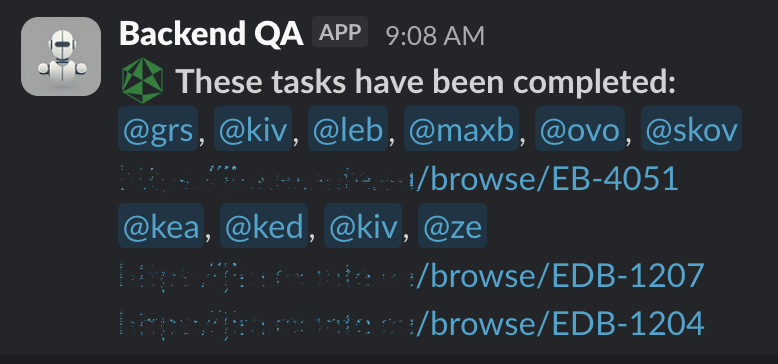
Known flakes are tagged with a specific marker. The test is rerun only when the error matches the description in the marker. If it passes on the rerun, that is mentioned separately in the notification.
We also have a separate script that analyses the history of test failures and reports those that recur day after day. It catches tests that fail consistently but were missed earlier for some reason.

Notification screenshots and the recurring-failure script.
So the start of a duty shift looks like this:
- A quick analysis by priority. Failures are split into groups: critical, quick wins, and items requiring investigation.
- Filing bugs, raising requests with relevant teams (infrastructure, adjacent teams) and discussing open questions during the daily.
- Adding markers that reference the registered tasks: xfail, skipif, skip, rerun_for. These are auto-merged without requiring approval, so the team is not distracted by these failures during the working day.
Step 2: Quick Wins
We have dealt with the failures that look critical, and we know their roots. What about the rest, where the cause is still unclear? The aim is not to dive into deep analysis. The aim is still to save time. The algorithm is:
- Is the test even needed? Does it actually verify something important? Are there other, stable tests that would catch the same problem? Could you simply turn it off? A test for a service that is no longer being developed, for example.
- If it is needed, is it too complex? Can it be simplified by isolating it as much as possible? It is easier to write a new test than to rewrite an old one. Check whether the old test accurately reflects the actual path through the system. We have had cases where an intermediate result came from a different service than the one the tested service was using. The result was races, delays and intermittent failures. As I said above, automated tests are not sacred. The person who wrote the test, even if it was you, may simply not have known how to write tests well at the time, or may not have understood the broader system.
- Do not jump straight into log diving and reproducing failures. Make assertions more informative. Add logging. Add specific tags to track in the logs. Verify that all instructions are covered by reporting steps where reporting is in use. After a few subsequent failures, this gives you enough starting information to begin a deeper debug.
- On top of that, failures are analysed by an AI bot that suggests possible solutions based on data from the Allure report and code analysis.
Step 3: Investigation and Collaboration
Now we can finally get to the classic process of debugging and digging. Even here, you need an approach that stops you from drowning in time you cannot get back.
The algorithm is:
- Analysis. Spend a couple of hours conducting an initial analysis of the test and gathering information on possible causes of the failure.
- Cooperation. Get on a call with whoever it makes sense to share information with: a team lead, a duty engineer from another team, or the infrastructure team. The choice depends on what your analysis tells you. Form one or more hypotheses together. The value is in getting an outside view that is not focused on the details and does not lose sight of the bigger picture.
- Hypothesis testing. Experiment, gather new insights.
- Summarising results. Get on another call to decide which solution to apply.
- Implementation: We lock in the solution. It may not be final, but it moves us toward a more isolated and stable state.
With each iteration, the volume of validated information grows. That makes it possible to land on the right solution in the shortest time.
Whether to delete old cases
Tests that have been disabled are not lost. A separate script collects them, checks the status of the linked tasks (a linter prevents adding markers without a task) and reports which tests need to be revisited when a task status changes to closed.
What about bulky tests that have a simpler alternative? The ones written incorrectly? You can delete them with a clear conscience. Or can you?
Let me invert the question once more and argue in their defence. If you have the time, do not delete them. Once your regression suite fails only when there is a real reason, giving you immediate feedback on breaking changes, come back to the disabled tests. They are a source of strange and unpredictable behaviour, and that behaviour reveals less obvious details about how the system under test really works.
For example, we discovered that one of our intermediate services, when pushed by client (test) requests, was so eager to modify an order that had not yet been placed that it broke the order itself. Writing correct tests, we would probably never have thought to simulate that situation, because it did not happen every time. Thanks to a careless test with an element of randomness, we ended up with another valuable case.
Summary
A tool is not an end in itself. It serves specific purposes. An automated test is a tool. Its purpose is to deliver information about degradation in the service under test quickly. To keep it in good shape, you need to:
- Filter and prioritise information about failures by removing the noise. This reduces the cognitive load on the engineer.
- Apply simple, fast solutions to iteratively improve the tests.
- Limit the time spent on each problem.
Most importantly, do this continuously. Do not put it in the backlog. It is a separate process that runs in parallel with feature development.
With this approach, our tests turn green again faster. Each new failure is now more often a signal about the state of a service or environment, and less often a mystery that quietly eats engineering time.
Ten artykuł jest publikowany wyłącznie w celach informacyjnych i nie powinien być traktowany jako oferta lub zachęta do kupna lub sprzedaży jakichkolwiek inwestycji lub powiązanych usług, do których można się tu odwołać. Obrót instrumentami finansowymi wiąże się ze znacznym ryzykiem strat i może nie być odpowiedni dla wszystkich inwestorów. Wyniki osiągnięte w przeszłości nie są wiarygodnym wskaźnikiem wyników w przyszłości.






Stworzone przez profesjonalistów. Dla profesjonalistów.
